photo Bloggerrebootheadertrial.png
Showing posts with label Design. Show all posts

08 March 2013

Roundup + Giveaway!


I had the idea to do a Design Week in December of last year.  I figured that it would be a wonderful way to showcase some talented and beloved designers and bloggers out there as well as a great way to compile some valuable information.  We Do Design, coined by the lovely Rachel from lala Lists, became so much more amazing than I originally imagined.  I met some wonderful bloggers and designers and every single post (or "session") turned out so amazing and perfect.  I am beyond grateful to each of these 14 girls who took the time to put together a fabulous post and I really hope that you all were able to benefit from their expertise.  To conclude the amazing whirlwind of a week, I have round up the 14 sessions and have one last surprise for all of you: a giveaway!  Eleven of you will have the opportunity to win designs for your blogs.  So spread the love to these 14 amazing woman by entering, following, and showing your support to their blogs and business.  Thank you!
Love, A.

>> Typography (+) March Downloadable Calendar by Rachel from lala Lists

Roundup + Giveaway!


I had the idea to do a Design Week in December of last year.  I figured that it would be a wonderful way to showcase some talented and beloved designers and bloggers out there as well as a great way to compile some valuable information.  We Do Design, coined by the lovely Rachel from lala Lists, became so much more amazing than I originally imagined.  I met some wonderful bloggers and designers and every single post (or "session") turned out so amazing and perfect.  I am beyond grateful to each of these 14 girls who took the time to put together a fabulous post and I really hope that you all were able to benefit from their expertise.  To conclude the amazing whirlwind of a week, I have round up the 14 sessions and have one last surprise for all of you: a giveaway!  Eleven of you will have the opportunity to win designs for your blogs.  So spread the love to these 14 amazing woman by entering, following, and showing your support to their blogs and business.  Thank you!
Love, A.

>> Typography (+) March Downloadable Calendar by Rachel from lala Lists

Color Theory


Hey everybody! It's Stefani from Simply Stefani (again) here to talk about something that I love...a lot.


When I sit down to design something, I always start thinking about the colors I'm going to use first. For some it's font (and don't get me wrong, I love a good font), but I'm all about the perfect colors. They can really make or break a design.

So the question becomes, where do you find the inspiration for the perfect color combination? And then after that, how do you know that the colors you love will really work together?

Let's start with inspiration.

I'll start by browsing around some of my favorite sites and seeing what pops out at me. Here are the first places I go...

1. Design Seed


2. For the Love of Color

3. The Color Collective


These three sites will take a picture or design and tell you which colors are used in it. They're great places to look for inspiration and to see how different colors look together.

4. MulticolorEngine


This search engine is SO cool. You can search for as many different colors as you'd like, and from there it will pull up photos from Flickr that contain those colors. It's great if you're looking for a fun pattern/texture to use in your design. Just make sure the photo you're using is offered under Creative Commons.

5. COLOURlovers


Last, but certainly not least - this is my favorite site of them all. COLOURlovers is a community of designers (and people obsessed with color) that allows you to upload color schemes or search through palettes that others have uploaded. You can also find patterns and textures as well, which are great to add a little depth to your design.

So...now you have some inspiration. How do put everything together so the color combo "looks right"? That's where a lot of the color theory aspect comes in.

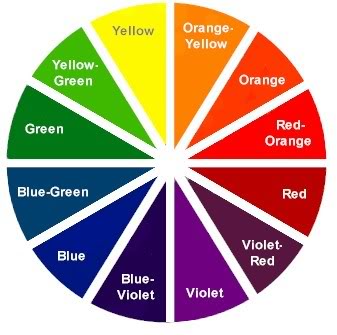
I'm by no means an expert, at all. But I do know that color harmony is extremely important when you're building a color scheme. What does this mean? It means you'll want to choose one of these groups.

Source: The Color Wheel

1. Analogous Colors

These are colors that are on the same side of the color wheel. They usually come in sets of three. So, in the example above, you could choose green, yellow-green, and yellow.

2. Complimentary Colors

Colors that are directly across from each other in the color wheel, like red and green, or violet and yellow.

3. Triad

Make a triangle...those are you colors. In this example, we could use violet, green, and orange.

4. Split Complimentary

Like complimentary, except you use the two colors adjacent to the color across from your choice. It's a complicated one. So...in the wheel above, you could choose violet, yellow-green, and orange-yellow. Or blue, orange-yellow, and red-orange.

5. Rectangle

It's like triad, except you make a rectangle! So yellow, orange, blue, and violet would be a rectangle color harmony.

6. Square

Last is square...which is pretty self-explanatory. Each color will be equi-distant from the next color. So in the color wheel above, you'll pick the four colors that are two colors away from each other (ok, so it's kind of complicated...). For this color harmony, you could use violet-red, blue, yellow-green, and orange.

Do you want to learn more? Check out this site.

There is so much to color theory (what about tints, shades, tones, all that stuff?!). But this should get you started. There are also some awesome websites that will help you build a palette according to the color harmony you want to use, such as Color Scheme Designer, Kuler, and Color Wizard.

And now that I've told you everything you'll ever want to know about color...I'm done! Thanks, Amy for letting me participate in Design Week! It's been totally awesome. :-)


Color Theory


Hey everybody! It's Stefani from Simply Stefani (again) here to talk about something that I love...a lot.


When I sit down to design something, I always start thinking about the colors I'm going to use first. For some it's font (and don't get me wrong, I love a good font), but I'm all about the perfect colors. They can really make or break a design.

So the question becomes, where do you find the inspiration for the perfect color combination? And then after that, how do you know that the colors you love will really work together?

Let's start with inspiration.

I'll start by browsing around some of my favorite sites and seeing what pops out at me. Here are the first places I go...

1. Design Seed


2. For the Love of Color

3. The Color Collective


These three sites will take a picture or design and tell you which colors are used in it. They're great places to look for inspiration and to see how different colors look together.

4. MulticolorEngine


This search engine is SO cool. You can search for as many different colors as you'd like, and from there it will pull up photos from Flickr that contain those colors. It's great if you're looking for a fun pattern/texture to use in your design. Just make sure the photo you're using is offered under Creative Commons.

5. COLOURlovers


Last, but certainly not least - this is my favorite site of them all. COLOURlovers is a community of designers (and people obsessed with color) that allows you to upload color schemes or search through palettes that others have uploaded. You can also find patterns and textures as well, which are great to add a little depth to your design.

So...now you have some inspiration. How do put everything together so the color combo "looks right"? That's where a lot of the color theory aspect comes in.

I'm by no means an expert, at all. But I do know that color harmony is extremely important when you're building a color scheme. What does this mean? It means you'll want to choose one of these groups.

Source: The Color Wheel

1. Analogous Colors

These are colors that are on the same side of the color wheel. They usually come in sets of three. So, in the example above, you could choose green, yellow-green, and yellow.

2. Complimentary Colors

Colors that are directly across from each other in the color wheel, like red and green, or violet and yellow.

3. Triad

Make a triangle...those are you colors. In this example, we could use violet, green, and orange.

4. Split Complimentary

Like complimentary, except you use the two colors adjacent to the color across from your choice. It's a complicated one. So...in the wheel above, you could choose violet, yellow-green, and orange-yellow. Or blue, orange-yellow, and red-orange.

5. Rectangle

It's like triad, except you make a rectangle! So yellow, orange, blue, and violet would be a rectangle color harmony.

6. Square

Last is square...which is pretty self-explanatory. Each color will be equi-distant from the next color. So in the color wheel above, you'll pick the four colors that are two colors away from each other (ok, so it's kind of complicated...). For this color harmony, you could use violet-red, blue, yellow-green, and orange.

Do you want to learn more? Check out this site.

There is so much to color theory (what about tints, shades, tones, all that stuff?!). But this should get you started. There are also some awesome websites that will help you build a palette according to the color harmony you want to use, such as Color Scheme Designer, Kuler, and Color Wizard.

And now that I've told you everything you'll ever want to know about color...I'm done! Thanks, Amy for letting me participate in Design Week! It's been totally awesome. :-)


07 March 2013

Fabulous Design Resources


I once was told design is basically arranging multiple elements in a single space. I think it's a little more complicated than that, but other times it's not. You don't always have to be the most creative, artistic, or web-savvy person to be able to come up with a design, but to begin you should know your resources. I thought I would take a few minutes to put together a little directory of my favorite places to find all things design-related.

You have probably seen these color boards scattered around Pinterest boards, and for good reason. You can search by color, season, theme, or even a specific color value. I always recommend my clients to check out this site when looking for the perfect color combo inspiration.

Another great tool to explore, share, and create color schemes. It lets you play with different rules, for example, it can find the color that goes best with your favorite shade of mint. It even has a rating system so you can find some of the most popular palettes that suit your fancy.

Perfect for the visuals out there who respond to photos for color inspiration rather than swatches. This site is awesome because you can upload any hosted image and it will pull the colors automatically, creating your very own color palette.

As a designer I like using Google fonts because I can easily incorporate them into the CSS of my blog design clients code. If it's not a Google Web font, installing custom post, date, and sidebar titles can get complicated. If I know I want to use a fun font in the CSS, this is the first place I look for choices.

This is my go-to site when looking for new fonts, 1) because they are 100% commercial free so I won't have to worry about using them in my design work, and 2) because they have a high quality selection, so I don't have to search too hard to find the good ones.

If you're looking for a free font, this is usually where you'll find it. I like how they have them sorted into different categories and list by most popular - I've done many downloading sprees here! Just make sure you understand the definition of "free" and read the font's terms of use before using commercially.

Katrina is an amazing designer, inspires me on every visit, and leads by example. Not only a favorite to find great quality design elements, but also a source for everything design-related. Free downloads, tutorials, and resources galore, or just buy her Blog Bling Kit for $25 for a variety of the best.

Royalty-free stock photos! I was introduced to this site during school, and whenever I needed some good photography, textures, and high-res clip art this is the place I went.

I was first introduced to this site when looking for old vintage photography I could use for a project. A lot of the photos are shared by Flickr users that agree to release all copyright, but a lot of them are uploaded from old libraries and cities. If anything, it's fun just to have a look around.

If you've ever wanted to brush up on your Photoshop skills, this is the place to go. It has an assortment of the most helpful Photoshop tutorials out there and is probably the best resource for those who love our beloved Adobe program.

I honestly think everyone should have a basic knowledge of HTML and CSS, and this site provides that. I used it a lot in my web courses at school and focused on the HTML and CSS portions, but it also has all kinds of web development information, and is great to use as a guide or quick reference.

Whenever I get stuck on coding in Blogger and need to Google a quick tutorial, this site is the one I most often land on. It has a list of helpful and easy tutorials that anyone can do, and as long as you know how to read instructions and copy/paste, you can pull it off.

* * * * *

I can't list them all, but bottom line - there are thousands of sites out there dedicated to creating, sharing, and inspiring - you just have to look and get inspired!


Fabulous Design Resources


I once was told design is basically arranging multiple elements in a single space. I think it's a little more complicated than that, but other times it's not. You don't always have to be the most creative, artistic, or web-savvy person to be able to come up with a design, but to begin you should know your resources. I thought I would take a few minutes to put together a little directory of my favorite places to find all things design-related.

You have probably seen these color boards scattered around Pinterest boards, and for good reason. You can search by color, season, theme, or even a specific color value. I always recommend my clients to check out this site when looking for the perfect color combo inspiration.

Another great tool to explore, share, and create color schemes. It lets you play with different rules, for example, it can find the color that goes best with your favorite shade of mint. It even has a rating system so you can find some of the most popular palettes that suit your fancy.

Perfect for the visuals out there who respond to photos for color inspiration rather than swatches. This site is awesome because you can upload any hosted image and it will pull the colors automatically, creating your very own color palette.

As a designer I like using Google fonts because I can easily incorporate them into the CSS of my blog design clients code. If it's not a Google Web font, installing custom post, date, and sidebar titles can get complicated. If I know I want to use a fun font in the CSS, this is the first place I look for choices.

This is my go-to site when looking for new fonts, 1) because they are 100% commercial free so I won't have to worry about using them in my design work, and 2) because they have a high quality selection, so I don't have to search too hard to find the good ones.

If you're looking for a free font, this is usually where you'll find it. I like how they have them sorted into different categories and list by most popular - I've done many downloading sprees here! Just make sure you understand the definition of "free" and read the font's terms of use before using commercially.

Katrina is an amazing designer, inspires me on every visit, and leads by example. Not only a favorite to find great quality design elements, but also a source for everything design-related. Free downloads, tutorials, and resources galore, or just buy her Blog Bling Kit for $25 for a variety of the best.

Royalty-free stock photos! I was introduced to this site during school, and whenever I needed some good photography, textures, and high-res clip art this is the place I went.

I was first introduced to this site when looking for old vintage photography I could use for a project. A lot of the photos are shared by Flickr users that agree to release all copyright, but a lot of them are uploaded from old libraries and cities. If anything, it's fun just to have a look around.

If you've ever wanted to brush up on your Photoshop skills, this is the place to go. It has an assortment of the most helpful Photoshop tutorials out there and is probably the best resource for those who love our beloved Adobe program.

I honestly think everyone should have a basic knowledge of HTML and CSS, and this site provides that. I used it a lot in my web courses at school and focused on the HTML and CSS portions, but it also has all kinds of web development information, and is great to use as a guide or quick reference.

Whenever I get stuck on coding in Blogger and need to Google a quick tutorial, this site is the one I most often land on. It has a list of helpful and easy tutorials that anyone can do, and as long as you know how to read instructions and copy/paste, you can pull it off.

* * * * *

I can't list them all, but bottom line - there are thousands of sites out there dedicated to creating, sharing, and inspiring - you just have to look and get inspired!


Creating a Reader-Friendly Layout


Hello, I am Melissa! I blog over at The Life of a Not So Ordinary Wife and you can check out my design site at Not So Ordinary Designs


My first response to a blog is definitely their design, the pretty header and sidebar titles and so on. Then after about a minute of swooning over it, I start to read a post and this is where some bloggers loose me. I am pretty sure most other feel the same way, the design is your first impression but a first impression only gets you so far. Remember Tierra on the tv show "The Bachelor"? Yes she definitely got the first impression rose, but see how far that got her? 
A big percentage of people staying and becoming a follower of your blog is if your layout is reader friendly and here are couple tips to make it just that:
1. Pictures. Need I say more? I would much rather read a post with a picture in between each paragraph then just a huge block of text that goes on and on. Most people are very visual and words on a screen are boring. Add some spice to your post and place some nice quality picture, preferable the same size and width. 
2. Your Name, not just your blog's name. Your readers can't connect with you if their is no name to be found on your blog. I know it seems really simple but believe me I have found several bloggers who I have had to search high and low just to get their name. Creating a quick welcome picture with your name and even a sentence that sums up the real you is crucial for connecting to your readers.
3. Search Box. There are some blogs where I love and go back to over and over again. There was even this one that I remember that had a great DIY that I wanted to bring back up so I went looking for a search box and.... nothing. I had to click her DIY label and go through all the posts to find it. Yeah, not so reader friendly. It is important for us to make it as easy as possible for others to find things on our blog.
4. Favorite Posts are huge in my mind! When people go to your blog's home page all that represents you is one your design and two the first post they see. What if that post is not as great as that last one your wrote? If you make some pretty little buttons of your favorite posts on your sidebar it gives new readers a chance to see you at your best! 
5. Declutter. I know we hear "don't clutter your blog" often. But what does that mean? Maybe it just means instead of getting rid of stuff try making it all the same width so it runs down your sidebars nicely. Or try adding some space in between sidebar widgets/gadgets so it is more pleasing to the eye. There are always ways to organize better instead of just deleting things.
6. Email. I don't know if it's just me but I always have the hardest time finding emails on blogs. I realize sometimes its a personal thing, that you don't want others to have because you're scared of spam but I would highly suggest creating a free gmail account for just your blog. I get so many emails of other bloggers just pouring their life stories into an email and it's so rewarding for me to connect with them. Don't miss that opportunity!
7. Grab Button. Every once in a while I will visit a blog and see my button on their sidebar. Why is it there? Because I gave them an opportunity to spread the word by adding a grab button right on my sidebar. I think you will be amazing how many blogger might grab the button and you get free advertisement. Just make sure to have the code below the button so it's convenient for them.

I think I am going to end this at lucky #7. If you have any questions about making your blog more reader friendly feel free to email me at melissa@thelifeofanotsoordinarywife.com

You can also check out my design site: Not So Ordinary Designs and use the promo code 25OFF for 25% off any blogger package. 

Creating a Reader-Friendly Layout


Hello, I am Melissa! I blog over at The Life of a Not So Ordinary Wife and you can check out my design site at Not So Ordinary Designs


My first response to a blog is definitely their design, the pretty header and sidebar titles and so on. Then after about a minute of swooning over it, I start to read a post and this is where some bloggers loose me. I am pretty sure most other feel the same way, the design is your first impression but a first impression only gets you so far. Remember Tierra on the tv show "The Bachelor"? Yes she definitely got the first impression rose, but see how far that got her? 
A big percentage of people staying and becoming a follower of your blog is if your layout is reader friendly and here are couple tips to make it just that:
1. Pictures. Need I say more? I would much rather read a post with a picture in between each paragraph then just a huge block of text that goes on and on. Most people are very visual and words on a screen are boring. Add some spice to your post and place some nice quality picture, preferable the same size and width. 
2. Your Name, not just your blog's name. Your readers can't connect with you if their is no name to be found on your blog. I know it seems really simple but believe me I have found several bloggers who I have had to search high and low just to get their name. Creating a quick welcome picture with your name and even a sentence that sums up the real you is crucial for connecting to your readers.
3. Search Box. There are some blogs where I love and go back to over and over again. There was even this one that I remember that had a great DIY that I wanted to bring back up so I went looking for a search box and.... nothing. I had to click her DIY label and go through all the posts to find it. Yeah, not so reader friendly. It is important for us to make it as easy as possible for others to find things on our blog.
4. Favorite Posts are huge in my mind! When people go to your blog's home page all that represents you is one your design and two the first post they see. What if that post is not as great as that last one your wrote? If you make some pretty little buttons of your favorite posts on your sidebar it gives new readers a chance to see you at your best! 
5. Declutter. I know we hear "don't clutter your blog" often. But what does that mean? Maybe it just means instead of getting rid of stuff try making it all the same width so it runs down your sidebars nicely. Or try adding some space in between sidebar widgets/gadgets so it is more pleasing to the eye. There are always ways to organize better instead of just deleting things.
6. Email. I don't know if it's just me but I always have the hardest time finding emails on blogs. I realize sometimes its a personal thing, that you don't want others to have because you're scared of spam but I would highly suggest creating a free gmail account for just your blog. I get so many emails of other bloggers just pouring their life stories into an email and it's so rewarding for me to connect with them. Don't miss that opportunity!
7. Grab Button. Every once in a while I will visit a blog and see my button on their sidebar. Why is it there? Because I gave them an opportunity to spread the word by adding a grab button right on my sidebar. I think you will be amazing how many blogger might grab the button and you get free advertisement. Just make sure to have the code below the button so it's convenient for them.

I think I am going to end this at lucky #7. If you have any questions about making your blog more reader friendly feel free to email me at melissa@thelifeofanotsoordinarywife.com

You can also check out my design site: Not So Ordinary Designs and use the promo code 25OFF for 25% off any blogger package.